Exam Management Guide
Effectively manage exams with the following functionalities.

Accessing the Console Click the Exams tab [1].
- Utilize the filter/search feature to locate exams [2] (searching is not case-sensitive).
- Open the Exam Management Console by clicking the View Results link [3] for a specific exam.
Exam Management Console
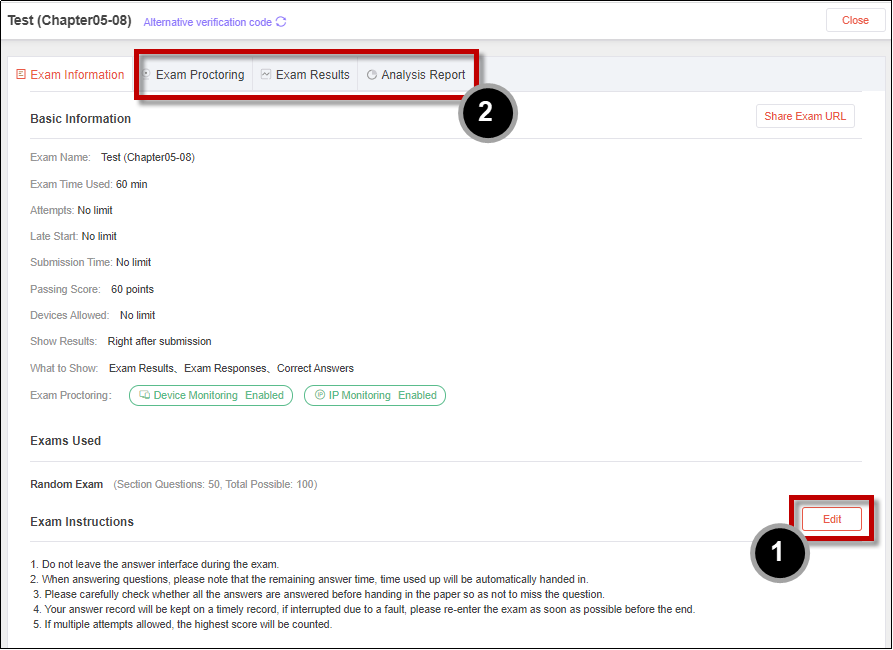
Editing Exam Instructions
Edit Exam Instructions [1] for an exam.
- These instructions are visible to exam-takers on the exam home screen before starting the exam.
Other Actions
Explore a range of actions within the Exam Management Console:
- Refer to the ULearning Teacher Guide [2] for a comprehensive list of actions available to the exam owner.
ℹ️
For detailed steps on each action, consult the ULearning Teacher Guide.